





























How to Choose the Right Paper Size for Your Printer
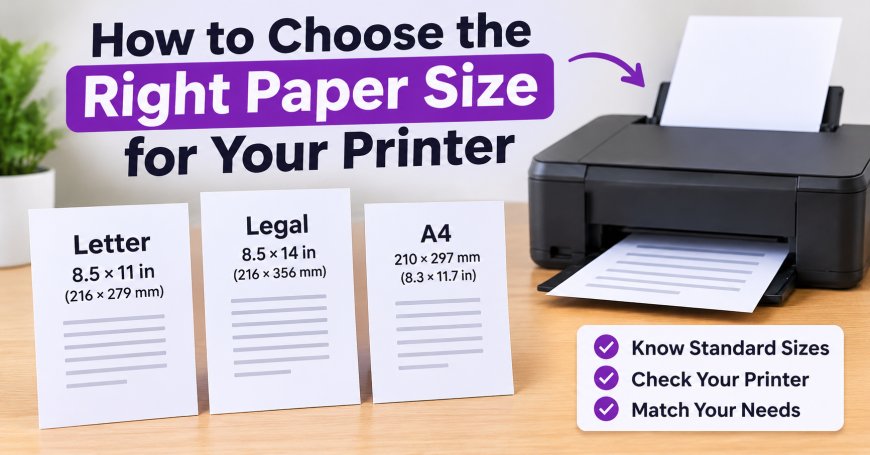
Choosing the right paper size for your printer depends on your printing needs and printer compatibility. Understand common paper sizes such as Letter, Legal, and A4, check your printer's supported dimensions, and match paper settings with the document before printing to avoid formatting and alignment issues.

Selecting the correct paper size is important to get clear and well-aligned printouts. Choosing the wrong size can result in text cutting off, irregular margins, spacing, and print errors. Knowing the standard printer paper sizes can be very helpful when printing various forms, including documents, pictures, business forms, and envelopes.
Understand Standard Printer Paper Sizes
The first step when selecting paper is to see what sizes are supported by your printer. Different regions of the world have different standard printer paper sizes.
1. Letter Size (8.5 × 11 Inches)
This is the standard printer paper size in the United States and is used to print the majority of documents and assignments. It is also used to print business letters, invoices, reports, and other forms.
2. Legal Size (8.5 × 14 Inches)
This size is longer than Letter size and is used to print legal documents and other paperwork.
3. A4 Size (210 × 297 mm)
This size is used internationally and is similar to Letter size, but longer and narrower.
4. Other Common Paper Sizes
A3 and A5 sizes are also used for various printing, as well as envelopes of different sizes and photo paper of different dimensions.
Check Your Printer's Supported Paper Dimensions
Different printers support different sizes of paper. It is always a good idea to check what sizes your printer is able to handle before purchasing paper of that size.
1. Check the Paper Tray
The paper guides in the paper tray are adjustable to various sizes (i.e., Letter, Legal, and A4). Look to see where the markings are and buy paper of that size.
2. Review Printer Specifications
To confirm the supported paper sizes for your printer, visit the manufacturer's website or review your printer manual. Check the minimum and maximum paper dimensions, especially when printing on photo paper and other specialty media.
Choose Paper Size Based on Your Printing Needs
The paper size is also determined by the type of document you want to print.
- Everyday printing: For everyday printing like letters, reports, and forms, either Letter size or A4 paper is OK to use.
- Legal Documents: For vertical space, like legal forms and other legal documents, use Legal paper size.
- Photos: If printing photos, use speciality paper size for photo printing (i.e., 4x6, 5x7, etc.)
- Posters and Presentations: For large printing, use the A3 paper size.
- Notes and booklets: For smaller printing, use the A5 paper size.
Match Paper Size in Printer Settings
Make sure your printer settings also reflect the correct paper size.
1. Adjust Document Settings
Open your document’s page setup or print settings and select the appropriate paper size (Letter or A4).
2. Check Printer Preferences
Before you print, you need to go to the printer’s preferences or properties and check that the paper size is set to the size loaded in the paper tray. You also need to check paper type and orientation.
What Happens If You Select The Wrong Paper Size?
If the paper size in the document is set to a size other than the paper size loaded in the printer’s tray, text can shift, images can get cropped, and margins can be unexpected. Some printers can also get stuck during a print job and display a paper mismatch warning.
To prevent these issues, always adjust document size, paper size in printer settings, and paper dimensions to the actual paper to be printed.
Final Thoughts
The paper sizes compatible with your printer will depend on the document’s requirements. The most common paper sizes are Letter, Legal, and A4. For specialty printing, other paper sizes may be required. For best results, match the paper size loaded in the printer tray with the document size and printer settings.
For more information, please visit DevicFixes.com
What's Your Reaction?