































How to Choose the Best VPN for Streaming Without Sacrificing Privacy
Learn how to choose the best VPN for streaming based on speed, server locations, privacy, device support, and reliable performance.

Best VPN for Streaming: What Should You Look For?
Streaming has become one of the most popular ways to watch movies, TV shows, sports, documentaries, and online content. With multiple devices connected to the internet, viewers increasingly want a streaming setup that is fast, private, flexible, and reliable.
A VPN can add an extra layer of privacy while you stream by encrypting your internet connection and routing traffic through a VPN server.
However, not every VPN is equally suitable for streaming.
Choosing the best VPN for streaming requires more than simply looking at the number of servers a provider advertises. Connection speed, server locations, encryption, device compatibility, and overall reliability can all affect your experience.
What Is a Streaming VPN?
A streaming VPN is a VPN service used while watching online content.
When connected to a VPN, your internet traffic travels through an encrypted connection to a VPN server before reaching the destination.
This can provide several privacy benefits, including hiding your public IP address from websites and services.
For streaming users, VPN performance is especially important because video content requires a stable connection and sufficient bandwidth.
A slow or unreliable VPN can result in buffering, lower video quality, or connection interruptions.
Why Use a VPN for Streaming?
There are several reasons people choose to use a VPN while streaming.
Improve Online Privacy
A VPN can hide your public IP address and encrypt your connection between your device and the VPN server.
This can make your internet activity more private, particularly when using shared or unfamiliar networks.
Secure Your Connection
Encryption can provide an additional layer of protection for your internet traffic.
This is especially useful when you are streaming while connected to public Wi-Fi at hotels, cafés, airports, or other shared locations.
Access Your Own Services While Traveling
Some online services may behave differently depending on your location.
A VPN can allow users to connect through servers in different regions, although availability and content access depend on the streaming provider's own policies and licensing agreements.
What Makes the Best VPN for Streaming?
A good streaming VPN should balance privacy with performance.
Here are the most important features to consider.
1. Fast Connection Speeds
Streaming requires consistent bandwidth.
If a VPN significantly reduces your connection speed, you may experience:
-
Buffering
-
Lower video quality
-
Longer loading times
-
Interrupted playback
-
Difficulty streaming high-resolution content
A quality VPN should minimize unnecessary performance loss.
U Shield VPN uses WireGuard alongside AES-256-GCM encryption, combining modern VPN technology with strong encryption.
2. Wide Server Coverage
Server location can affect both performance and connection options.
A provider with servers in multiple countries gives users more locations from which to establish a VPN connection.
U Shield VPN currently advertises 120+ locations across 60+ countries.
When choosing a streaming VPN, consider whether the provider has server locations close to where you normally use the service.
3. Reliable Connections
Speed is not the only consideration.
A VPN can have impressive peak speeds but still be frustrating if connections frequently drop.
Look for a provider that focuses on stable connectivity and provides support when problems occur.
4. Multiple Device Support
Modern streaming rarely happens on only one device.
You might watch content on:
-
Smart TVs
-
Smartphones
-
Tablets
-
Laptops
-
Desktop computers
-
Gaming consoles
-
Streaming devices
A VPN that supports multiple platforms can make your setup much easier.
U Shield VPN states that it supports major platforms including Android, iPhone, iPad, Windows, and macOS.
VPN for Streaming on Smart TVs
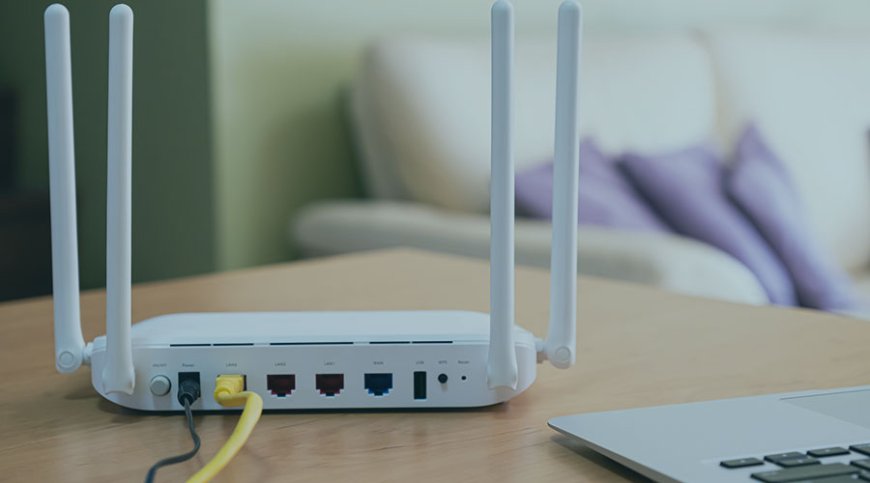
Smart TVs are one of the biggest reasons users consider a router-based VPN.
Many TVs do not provide the same VPN application support as computers and smartphones.
A VPN router can solve this problem by placing the VPN connection at the network level.
Once the TV connects to the protected network, it can use the VPN connection without necessarily requiring a VPN application installed directly on the television.
U Shield VPN offers a router-focused approach designed to protect connected devices through one central network connection.
Does a VPN Slow Down Streaming?
A VPN can reduce connection speed because your traffic is encrypted and routed through an additional server.
However, the impact varies depending on several factors.
Server Distance
Connecting to a server geographically close to you will often provide better performance than connecting to a distant server.
Server Load
Busy VPN servers may provide slower performance than less congested servers.
VPN Protocol
The VPN protocol can also influence speed and reliability.
WireGuard is designed to provide modern security with efficient performance, and U Shield VPN lists WireGuard among its VPN technologies.
Your Original Internet Speed
If your internet connection is already slow, adding a VPN may make streaming limitations more noticeable.
For high-quality streaming, your base internet connection should provide enough bandwidth for the resolution you want to watch.
How to Choose a VPN Server for Streaming
Choosing the right server can make a noticeable difference.
Start With a Nearby Server
If your goal is primarily privacy and stable streaming, begin with a server close to your physical location.
A shorter network route can potentially reduce latency.
Try Another Server if Performance Drops
If the connection becomes slow or unstable, switching servers can help.
VPN providers often operate multiple servers within different regions, giving you alternatives when one location is congested.
Consider the Desired Region
If you need to connect through a particular region for legitimate travel or account-access purposes, select a VPN server in that location.
Always follow the terms and conditions of the streaming service you use.
VPN Router vs VPN App for Streaming
Both options can be useful depending on your setup.
|
Feature |
VPN App |
VPN Router |
|
Smartphone streaming |
Excellent |
Works through Wi-Fi |
|
Laptop streaming |
Excellent |
Works through Wi-Fi |
|
Smart TV |
Depends on TV support |
Useful |
|
Gaming console |
Limited on some setups |
Useful |
|
Multiple devices |
Individual setup |
Centralized |
|
Setup |
Per device |
Network-level |
|
Portability |
Very convenient |
Depends on router |
If you mainly watch content on a phone or laptop, a VPN application may be enough.
If your home entertainment setup includes a smart TV, gaming console, streaming device, and several other products, a VPN router may offer greater convenience.
How to Stream More Privately With a VPN
Using a VPN is only one part of a privacy-conscious streaming setup.
Follow these practices for better overall security.
Keep Your Streaming Devices Updated
Install security and software updates regularly.
Updates can fix vulnerabilities and improve device performance.
Use Strong Account Passwords
Use unique passwords for streaming accounts.
A password manager can help you create and store strong credentials without requiring you to memorize every password.
Enable Multi-Factor Authentication
If your streaming provider supports MFA, enable it.
This adds another layer of account protection beyond your password.
Avoid Untrusted Wi-Fi
If you are streaming from a hotel, café, airport, or other public location, verify the Wi-Fi network before connecting.
A VPN can provide additional encryption when using these networks.
Is a Free VPN Good for Streaming?
Free VPNs can be tempting because there is no upfront cost.
However, users should carefully examine what they receive.
Free services may have limitations involving:
-
Server locations
-
Bandwidth
-
Connection speeds
-
Device support
-
Data allowances
-
Customer support
Streaming requires stable performance, so a VPN with significant limitations may not provide the experience you expect.
Before choosing a service, compare its speed, privacy practices, server coverage, supported devices, and pricing.
Why U Shield VPN Can Be Considered for Streaming
U Shield VPN combines a broad server network with modern VPN technology and multi-device support.
The company advertises more than 120 locations across 60+ countries, giving users a range of server locations to choose from.
Its VPN technology includes WireGuard and AES-256-GCM encryption, while supported platforms include Android, iPhone, iPad, Windows, and macOS.
For households with multiple streaming devices, U Shield VPN also promotes a VPN router designed to provide network-level protection.
The company additionally advertises 24/7 customer support, which can be useful when troubleshooting connection or setup issues.
Can a VPN Help With Streaming While Traveling?
Travelers often use different internet connections than they do at home.
A VPN can provide a consistent encrypted connection when switching between hotel Wi-Fi, airport Wi-Fi, café networks, and other connections.
It can also allow you to connect through VPN servers in different locations.
However, a VPN does not guarantee access to every streaming catalog. Streaming platforms can use their own systems to determine availability and may restrict or block VPN connections.
Always check the streaming provider's terms before using a VPN for location-based content.
What Should You Check Before Buying a Streaming VPN?
Before choosing a provider, create a simple checklist.
Look for:
-
Fast and stable connections
-
Multiple server locations
-
Modern VPN protocols
-
Strong encryption
-
Support for your preferred devices
-
Clear privacy policies
-
Reliable customer support
-
Transparent pricing
-
Easy setup
-
Suitable simultaneous-device support
Do not choose a VPN based solely on the number of servers or the lowest price.
Your actual streaming experience depends on the combination of speed, server performance, network quality, and device compatibility.
Final Thoughts
The best VPN for streaming should offer more than privacy.
It should provide a reliable balance of speed, stable connections, server coverage, security, and device compatibility.
For casual streaming on a phone or laptop, an easy-to-use VPN application may be all you need. For households with smart TVs, consoles, computers, and multiple connected devices, a VPN router can provide a more centralized solution.
U Shield VPN combines application-based VPN access with a router-focused option, giving users flexibility depending on how they consume online content.
Before choosing any VPN, compare the provider's technology, server locations, supported devices, privacy approach, and performance for your specific needs.
Frequently Asked Questions
What is the best VPN for streaming?
The best VPN for streaming should provide fast and stable connections, multiple server locations, strong encryption, reliable device support, and a privacy-focused service.
Does a VPN improve streaming quality?
A VPN does not automatically improve streaming quality. In some situations, it may help with connection consistency, but VPN performance depends on your internet connection, server distance, server load, and VPN protocol.
Can I use a VPN on my Smart TV?
It depends on your TV model and operating system. If your Smart TV does not support VPN applications, a VPN router can provide VPN connectivity at the network level.
Does U Shield VPN support streaming devices?
U Shield VPN promotes support for multiple connected devices and offers a VPN router designed to provide network-level VPN protection.
Is WireGuard good for streaming?
WireGuard is a modern VPN protocol designed for efficient performance and strong security. U Shield VPN lists WireGuard among the technologies used by its service.
Can a VPN hide my IP while streaming?
Yes. A VPN can replace your original public IP address with the IP address associated with the VPN server.
Can a VPN access every streaming library?
No. Streaming services control their own content availability and may detect or restrict VPN connections. A VPN does not guarantee access to every regional catalog.
How many server locations does U Shield VPN offer?
U Shield VPN currently advertises more than 120 locations across 60+ countries.
Does U Shield VPN support multiple platforms?
Yes. U Shield VPN states that its service supports Android, iPhone, iPad, Windows, and macOS.
What's Your Reaction?