































Microsoft Cloud Services for Business Productivity
Learn how Microsoft cloud services help businesses improve productivity, collaboration, security, scalability, and modern workplace operations.

How Microsoft Cloud Services Help Businesses Improve Productivity and Security
Businesses today rely heavily on cloud technology to communicate, manage information, collaborate with employees, and serve customers. As organizations grow, however, managing multiple applications, security tools, data sources, and communication platforms can become increasingly complicated.
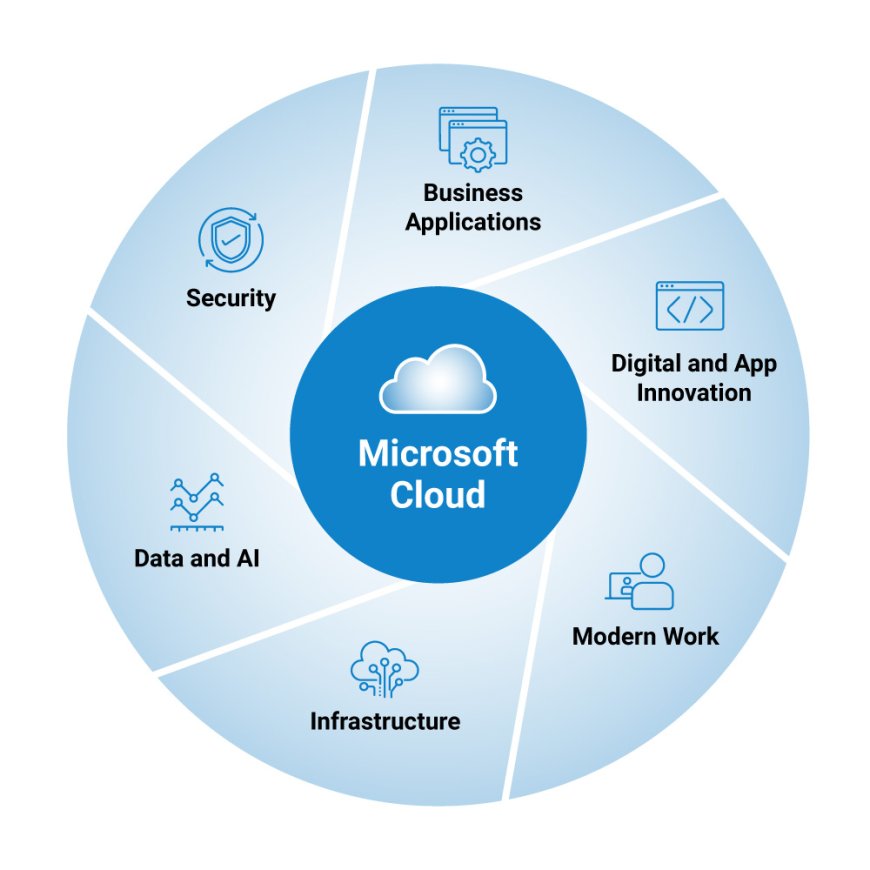
Microsoft's cloud ecosystem provides businesses with an opportunity to bring many of these capabilities together. From productivity applications and cloud infrastructure to business applications and security technologies, Microsoft's cloud platform can support organizations at different stages of their digital transformation.
What Are Microsoft Cloud Services?
Microsoft cloud services refer to a broad collection of cloud-based technologies and business solutions offered through Microsoft's ecosystem. These include Microsoft 365, Azure, Dynamics 365, security solutions, data platforms, and other cloud technologies.
Instead of maintaining every application and server within an organization's physical office environment, businesses can use cloud-based services that are accessible through the internet.
This approach can provide greater flexibility for organizations with employees working from different locations. Teams can access files, applications, communication tools, and business information without depending entirely on a traditional office infrastructure.
For businesses evaluating their technology strategy, Microsoft cloud services can provide a foundation for improving productivity while supporting broader cloud adoption.
1. Better Employee Collaboration
Modern businesses often have employees working across offices, cities, and countries. Traditional collaboration methods can make it difficult to keep documents, conversations, and projects organized.
Microsoft 365 provides tools designed around workplace collaboration. Employees can communicate through Teams, work on documents together, manage email through Outlook, and store files using cloud-based services.
The advantage is not simply having more software. The bigger benefit is having tools that can work together within the same ecosystem.
For example, an employee can collaborate with a colleague through Teams, share a document, edit it collaboratively, and continue the conversation without constantly switching between unrelated systems.
2. Improved Accessibility
Cloud technology changes where business applications and information can be accessed.
Employees who have appropriate permissions can work from home, from another office, or while traveling. This can be especially useful for organizations with hybrid or distributed teams.
Cloud accessibility also helps businesses reduce their dependence on a particular physical location. Instead of making the office the center of every technology process, organizations can build workflows that operate across locations.
Of course, accessibility needs to be combined with appropriate authentication, permissions, and security controls. Simply moving information to the cloud does not automatically make it secure.
3. Stronger Security Management
Security has become an important part of every organization's technology strategy.
Businesses need to protect accounts, documents, applications, customer information, and internal systems from unauthorized access.
Microsoft's ecosystem includes security and identity technologies that can help organizations implement controls such as multi-factor authentication, identity management, access policies, endpoint protection, and data security.
However, technology alone is not enough. Businesses also need appropriate configurations, policies, monitoring, and employee awareness.
This is one reason organizations often work with cloud consultants or managed service providers. Professional guidance can help businesses evaluate their existing environment and identify areas that require improvement.
4. Easier Scalability
A traditional IT environment can require significant planning when a company grows.
Adding employees may require additional hardware, software licenses, storage, and infrastructure. Cloud services can simplify some of these processes by allowing organizations to adjust services according to business requirements.
For example, a growing company may need additional Microsoft 365 licenses as it hires employees. Cloud-based services can make this type of expansion more manageable than building an entirely new infrastructure.
Scalability is particularly important for businesses experiencing rapid growth or seasonal changes.
5. Integration With Business Applications
Productivity applications are only one part of a company's technology environment.
Businesses may also need customer relationship management, enterprise resource planning, analytics, communication, and workflow automation.
Microsoft's broader ecosystem includes Dynamics 365 applications that can support areas such as sales, customer relationships, finance, supply chain management, and operations.
The ability to connect these systems can help reduce information silos.
For example, customer information managed through a CRM system can potentially be connected with other business processes, allowing employees to work with more complete information.
6. Supporting Digital Transformation
Digital transformation does not simply mean moving existing applications into the cloud.
It involves examining how technology can improve business processes.
A company might discover that employees spend hours manually transferring information between systems. Another organization might have outdated infrastructure that makes remote work difficult.
Cloud technology can provide the foundation for redesigning these processes.
Businesses can combine cloud applications, automation, analytics, and modern security practices to create more efficient workflows.
7. Managing Costs More Strategically
Cloud services can change how businesses approach technology spending.
Instead of investing heavily in physical infrastructure upfront, organizations can use subscription-based services and cloud resources according to their requirements.
However, cloud technology does not automatically reduce costs.
Unused licenses, unnecessary resources, poor configurations, and duplicated applications can still create unnecessary expenses.
Businesses should therefore regularly review their cloud environment and determine whether the services they pay for are actually being used.
Choosing the Right Cloud Strategy
Every organization has different requirements.
A small business may primarily need Microsoft 365 productivity tools, while a larger organization may require Azure infrastructure, Dynamics 365 applications, security solutions, and managed services.
Before adopting new technologies, businesses should evaluate their existing environment, identify operational challenges, define business goals, and determine which cloud services actually support those goals.
A structured approach can prevent organizations from purchasing technology simply because it is available.
Final Thoughts
Microsoft's cloud ecosystem can support businesses across productivity, collaboration, security, infrastructure, and business applications.
The most important consideration is not simply adopting cloud technology. Businesses need to implement the right services in the right way.
With proper planning, configuration, security practices, and ongoing management, Microsoft cloud technologies can become an important part of a modern business technology strategy.
What's Your Reaction?